 Skip to content

AI Assisted Development Tools in 2026: What Every Developer Needs to Know About Coding, Testing, and Deployment
AI assisted development tools are no longer optional, with 84% of developers already using or planning to integrate them into their workflows. These tools leverage large language models and automation to accelerate coding, testing, and deployment processes. Indeed, agencies using real-time AI code generation report development time reductions of up to 40%, while AI-driven testing identifies defects earlier and improves code reliability. In this guide, we’ll explore the top ai coding tools, best ai assisted development tools for testing and DevOps, and how to implement ai powered tools for software development effectively in your workflow.
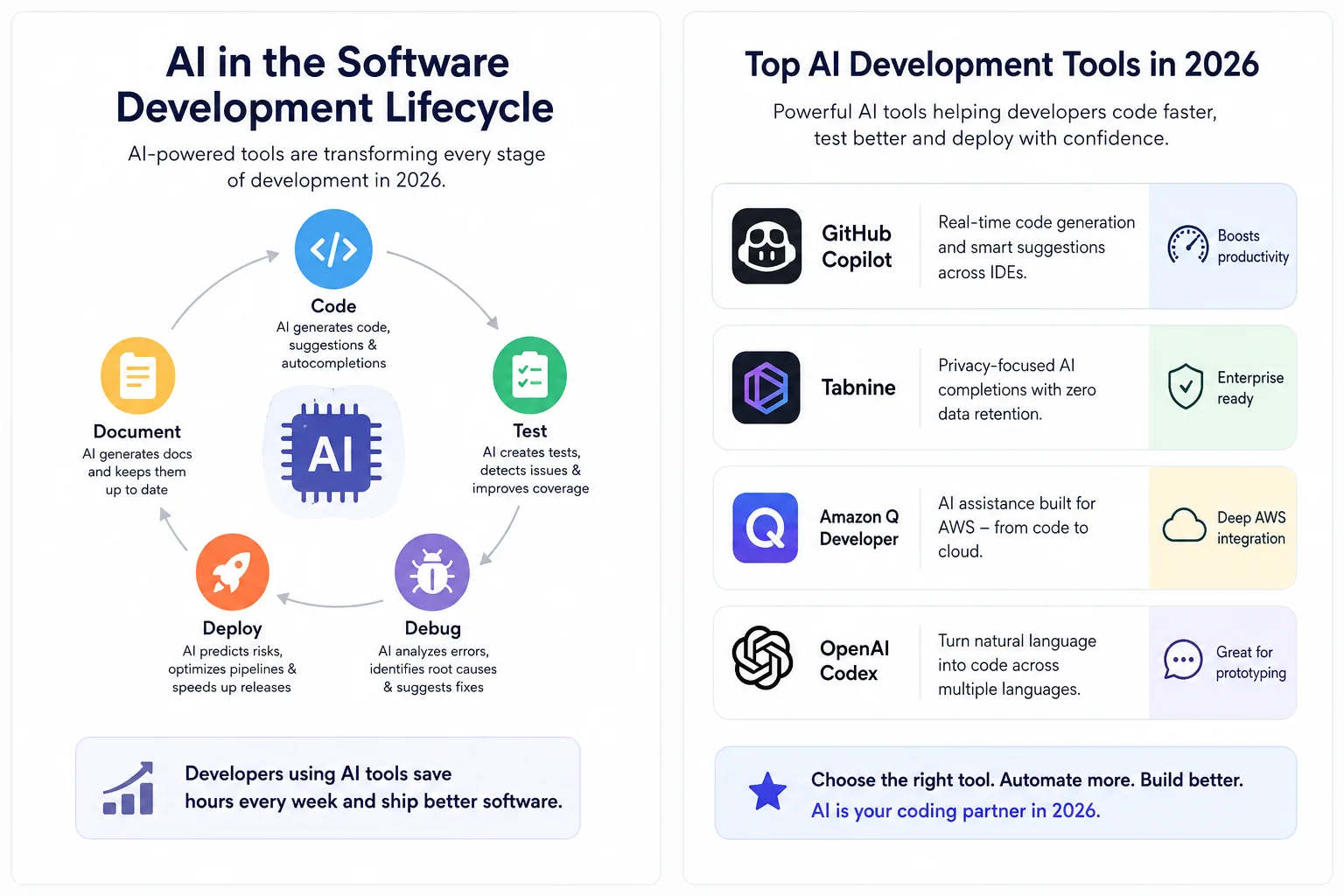
What Are AI-Assisted Development Tools in 2026
Software development now operates with AI systems that automate code generation, predict deployment risks, and maintain documentation without constant human oversight. AI assisted development tools use machine learning and natural language processing to handle tasks across the entire software development lifecycle. These platforms combine large language models trained on billions of code parameters with retrieval-augmented generation systems that understand your specific codebase, internal libraries, and organizational coding conventions.
Core Capabilities of AI Development Tools
Modern ai powered tools for software development deliver capabilities that extend far beyond simple autocomplete suggestions. Code assistants generate complete functions, classes, and data structures from natural language prompts. They analyze repository-wide context to provide architecturally coherent code rather than merely syntactically correct snippets.
AI tools handle automated testing pipelines by predicting high-risk areas in codebases and enabling smarter test coverage. Testing automation systems create, execute, and maintain tests across application stacks using machine learning to generate test cases from requirements. When bugs surface, AI-powered debugging analyzes error logs, stack traces, and code snippets for root cause identification and suggested fixes.
Security and quality assurance capabilities represent another dimension. AI-driven security tools apply machine learning models trained on large datasets of vulnerable and secure code to detect issues throughout the development lifecycle. Code review automation analyzes submissions, flags potential issues, and provides improvement suggestions during the review process.
Documentation generation remains one of the most practical applications. AI tools use natural language processing to interpret code changes and developer comments, producing accurate documentation for APIs, modules, and workflows with minimal manual intervention. Consequently, teams maintain up-to-date documentation without diverting resources from core development work.
How AI Tools Integrate Into Developer Workflows
Integration happens across multiple touchpoints in developer environments. AI coding assistants embed directly into IDEs, providing real-time code completions and suggestions as developers write. Tools like Gemini CLI bring AI assistance directly into terminals, understanding natural language prompts to generate code, assist with shell commands, and automate development tasks.
Repository-level integration allows AI systems to maintain persistent context across all development phases. These tools store plans, requirements, and design artifacts in project repositories, ensuring seamless continuation of work across multiple sessions. Multi-repository indexing enables AI to trace dependencies across service boundaries, addressing one of the hardest problems for large-scale enterprise environments.
The workflow operates through structured approaches where developers articulate desired functionality in detailed instructions rather than writing code line by line. AI breaks complex tasks into subtasks, executes multi-step plans, interacts with development tooling, runs tests, interprets error messages, and iteratively refines output. This agentic capability shifts AI from suggestion engine to coding partner capable of handling multi-file changes across large codebases.
Why Developers Are Adopting AI-Assisted Tools
Adoption stems from measurable productivity improvements and enhanced developer experience. Developers using AI tools save an average of 3.6 hours per week, with daily users achieving 60% higher PR throughput. Teams with AI adoption interact with 9% more tasks and 47% more pull requests per day.
Time savings appear across routine coding tasks, where AI reduces completion time by 46% on average. Code review cycles shorten by 35%, and mean time from feature request to production-ready code drops by 28%. Junior developers and recent hires show the largest gains, increasing output by 27% to 39%, whereas senior developers see productivity improvements of 8% to 13%.
Beyond speed, developers report higher job satisfaction. Tools relieve teams from repetitive tasks, allowing more time for engaging work. Developers using AI tools are more than twice as likely to report overall happiness, fulfillment, and the ability to reach flow state at work. AI equips developers to tackle new challenges effectively, making them 25-30% more likely to complete complex tasks within deadlines when faced with unfamiliar codebases or languages.
Top AI Coding Tools Every Developer Should Know
Selecting the right ai powered tools for software development depends on your specific workflow requirements, security constraints, and development stack. The market offers several mature options, each designed for distinct use cases.
GitHub Copilot for Real-Time Code Generation
GitHub Copilot holds approximately 42% market share among paid ai assisted development tools. The platform integrates with Visual Studio Code, Visual Studio, JetBrains IDEs, and Neovim, providing the widest IDE support available. Developers using Copilot report up to 75% higher job satisfaction and achieve up to 55% greater productivity when writing code.
Copilot generates real-time code suggestions ranging from snippets to full functions based on comments and existing code. The tool draws context from your coding environment, open tabs, and GitHub projects, including pull requests, issues, and your entire codebase. Developers keep roughly 46% of the code Copilot generates, indicating strong relevance and quality.
The pricing structure includes a free tier with 2,000 completions monthly and 50 agent mode requests. Pro subscriptions cost USD 10.00 monthly, while Business tier runs USD 19.00 per user monthly, and Enterprise reaches USD 39.00 per user monthly.
Tabnine for Privacy-Focused Code Completion
Tabnine operates under a strict no-train-no-retain policy. When using Tabnine models, your code remains private and is never retained or shared with third parties. The platform supports on-premises and air-gapped deployment options, addressing needs in highly regulated industries.
Context windows sent to Tabnine servers include code snippets, variables, type declarations, and related files, but this data is deleted immediately after generating responses. Tabnine does not train its models on your code; the completion model and protected chat model use only open-source code with permissive licenses.
Supporting over 600 programming languages, Tabnine adapts to your coding style through personalization while maintaining zero data retention. Pricing starts at USD 9.00 monthly for individual developers, with enterprise plans offering custom deployment configurations.
Amazon Q Developer for AWS Integration
Amazon Q Developer provides AI assistance specifically designed for AWS workflows. The platform integrates with GitLab Duo and GitHub, enabling feature development, automated code reviews, unit test generation, and integrated chat support. When you assign a GitHub issue to Amazon Q Developer, it generates new code and creates pull requests using the issue and project code as context.
The tool achieved the highest scores on the SWE-Bench Leaderboard, demonstrating strong autonomous coding capabilities. Amazon Q Developer includes security scanning that outperforms leading publicly benchmarkable tools across most popular programming languages.
Project-specific rules stored in Markdown files define coding standards and best practices, ensuring consistency across team members regardless of experience level. Free tier users receive 1,000 lines of code upgrades monthly, while Pro tier subscribers at USD 19.00 monthly gain 4,000 lines of code allocation per month.
OpenAI Codex for Natural Language Programming
OpenAI Codex translates natural language instructions into executable code across multiple programming languages. The system works best with GPT-5 family models, particularly gpt-5.5 for most code generation tasks. Codex integrates into VS Code and JetBrains IDEs through extensions available on macOS, Windows, and Linux.
Developers interact with Codex through chat mode, agent mode, or agent mode with full access, controlling the level of autonomy granted. The platform offloads longer development jobs to cloud environments, allowing you to monitor progress and review results without leaving your IDE.
ChatGPT Plus, Pro, Business, Edu, and Enterprise plans include Codex access, providing natural language programming capabilities alongside general AI assistance.
| Tool | Starting Price | Key Differentiator | Best For |
|---|---|---|---|
| GitHub Copilot | Free (2,000 completions/month) | Widest IDE support, 42% market share | General development across teams |
| Tabnine | USD 9.00/month | On-premises deployment, zero data retention | Security-sensitive organizations |
| Amazon Q Developer | Free (1,000 LOC/month) | AWS integration, highest SWE-Bench scores | AWS-centric development |
| OpenAI Codex | Included with ChatGPT plans | Natural language to code translation | Exploratory programming tasks |
AI Testing and Quality Assurance Tools
Testing and quality assurance present distinct challenges where ai assisted development tools deliver measurable impact. Automated testing platforms now handle test creation, execution, and maintenance through machine learning models that adapt to application changes.
testRigor for No-Code Test Automation
testRigor operates as a generative AI-based automation tool where 70,000+ companies build tests using plain English instructions. You write commands like “purchase a Kindle” and testRigor translates them into executable steps without requiring coding knowledge. The platform reduces test maintenance by up to 20x compared to Selenium-based approaches.
Tests remain stable because they reference elements as users see them on screen rather than relying on XPaths or CSS selectors. Machine learning algorithms and Vision AI analyze pages automatically, eliminating manual locator searches. Initial setup takes five minutes, with each test requiring roughly the same time as writing a manual test case.
CodeceptJS AI for Self-Healing Test Scripts
CodeceptJS integrates AI capabilities directly into its open-source testing framework. Self-healing functionality detects when UI elements change and automatically updates test steps to prevent failures. When a test fails due to locator changes, AI analyzes the error message, executed step, and HTML context to suggest fixes.
The platform matches new locators, retries commands, and continues test execution without manual intervention. For instance, if a “Sign in” button renames to “Login” or changes its class, CodeceptJS AI detects the new locator and retries automatically. The tool supports multiple AI providers including OpenAI, Anthropic, and Mixtral.
LambdaTest for Cross-Browser Testing
LambdaTest provides cloud-based testing across 3000+ browsers, devices, and operating systems. AI-powered automation with self-healing capabilities speeds up test creation by 10x and reduces build failures by 40%. The platform supports both manual and automated testing with parallel execution to reduce testing time.
Teams run tests on real browsers hosted on cloud servers, eliminating local equipment requirements. Integration with Selenium, Appium, and TestNG enables comprehensive testing workflows. Visual regression testing captures screenshots across browsers for pixel-by-pixel comparison.
AI-Powered Debugging and Error Detection
AI debugging tools use machine learning and natural language processing to detect anomalies, suggest fixes, and identify code issues faster than traditional methods. Gemini Code Assist understands code logic and patterns to catch bugs early in development cycles. These tools reduce debugging time by up to 50% through automated error flagging.
Developers should verify AI-generated suggestions rather than accepting them blindly. AI recognizes patterns and makes predictions based on training data, not project-specific architecture or business logic. Always test AI solutions and review their logic to ensure alignment with project requirements.
| Tool | Primary Capability | Key Metric | Pricing Model |
|---|---|---|---|
| testRigor | No-code plain English testing | 20x less maintenance vs Selenium | Freemium |
| CodeceptJS AI | Self-healing test scripts | Auto-fixes locator changes | Open-source |
| LambdaTest | Cross-browser testing | 40% fewer build failures | Cloud-based subscription |
| AI Debugging Tools | Error detection & fixes | 50% faster debugging | Varies by provider |
AI-Powered Deployment and DevOps Tools
Deployment pipelines now handle complex workflows where AI evaluates risk, predicts failures, and automates incident response across the software delivery lifecycle. AI-powered DevOps tools analyze historical deployment data, environment telemetry, and incident patterns to transition teams from reactive to proactive operational models.
CI/CD Pipeline Optimization with AI
AI analyzes past build data and performance patterns to automatically adjust pipeline settings, detect problems, and reallocate resources efficiently. Machine learning models predict which builds will fail before execution starts, flagging high-risk pipelines immediately for human review. AWS CodeGuru uses advanced machine learning to deliver code analysis through automated reviews and performance optimization, integrating seamlessly with existing CI/CD pipelines.
Automated Deployment Risk Prediction
Change Risk Prediction systems ingest data from CI/CD pipelines, ITSM platforms, and version control to produce quantitative risk scores for each change. AI analyzes change characteristics, historical context, quality indicators, and environmental factors to categorize deployments as low, medium, or high risk. Low-risk changes auto-approve with minimal friction, while high-risk modifications require architectural review or deployment during off-peak hours. AI systems aim to predict risky changes, automatically promote low-risk deployments, detect post-deployment anomalies, and trigger automatic rollbacks.
Infrastructure-as-Code Validation
AI-powered IaC validation analyzes Terraform plans and configuration files against organization policies before deployment. Generative AI automates creation of policy-compliant IaC using Amazon Bedrock, validating infrastructure requirements against organizational standards at the start. Security scanners integrated into CI/CD pipelines flag missing security contexts, overly permissive roles, and misconfigurations before production deployment.
Real-Time Monitoring and Incident Response
AIOps platforms reduce alert noise by 80% through intelligent filtering and event correlation. Datadog’s AI accelerates investigations by automatically correlating telemetry and surfacing outliers across tech stacks. PagerDuty AIOps improves triage efficiency through automated noise reduction and intelligent alerting. AI incident response systems automate ticket classification, perform anomaly detection, and apply predictive analytics to minimize mean time to resolution.
| Tool | Primary Capability | Key Benefit |
|---|---|---|
| AWS CodeGuru | Automated code reviews & performance profiling | Detects defects and security vulnerabilities |
| Datadog | AI-powered monitoring & anomaly detection | Correlates telemetry across infrastructure |
| Dynatrace | Davis AI for root cause analysis | Processes billions of dependencies in milliseconds |
| PagerDuty AIOps | Intelligent incident management | Reduces noise and improves triage efficiency |
How to Choose and Implement AI Development Tools
Choosing ai assisted development tools requires evaluating context awareness rather than focusing solely on autocompletion accuracy. Tools must understand your entire codebase architecture, answering questions like “how do we handle authentication across microservices?” or “which services break if this API changes?”. Platforms like Augment, Cursor, and Sourcegraph Cody provide deep semantic awareness across projects.
Evaluating Tools for Your Development Stack
Workflow integration matters more than feature counts. Does the tool work seamlessly within your IDE or create friction by requiring context switching? Prioritize overall developer experience over the underlying model, as a powerful engine in a poorly designed interface delivers limited value. Factor in total cost of ownership, including engineering time for setup, infrastructure costs for on-premise solutions, and ongoing management expenses.
Security and Data Privacy Considerations
Validate security claims with the same rigor applied to any tool accessing your source code. For finance, healthcare, or government sectors, on-premise or VPC deployment options are often non-negotiable, making Tabnine and Cody strong contenders. Verify compliance certifications including SOC 2 Type II and ISO 27001 as baseline vendor maturity indicators. Examine data usage policies closely, particularly whether vendors train models on your code and retention periods.
Measuring ROI and Developer Productivity
Track AI deflection rates measuring questions developers ask AI versus senior engineers, aiming for balanced usage rather than 100% deflection. Monitor revision rates on AI-generated code to assess whether developers use AI appropriately or accept suggestions blindly. Measure sprint cycle acceleration, pull request throughput increases, and code review velocity improvements while maintaining quality standards. In reality, only 29% of organizations can measure AI ROI confidently, though 79% report productivity gains.
Training Teams for AI-Assisted Workflows
Create internal champions who test new tools, share best practices, and help others adopt AI safely. Provide training not just on how to use tools, but when and why to use them, including effective prompt writing and code review policies for AI-generated code. Establish the principle that developers remain responsible for shipped code, treating AI as an assistant rather than an author. Rigorous code review becomes more critical than ever. Note that 90% of developers now use AI tools, yet trust in AI accuracy dropped to 29% from 40%.
| Evaluation Criteria | What to Look For | Why It Matters |
|---|---|---|
| Context Awareness | Repository-wide understanding, architectural reasoning | Distinguishes tools that comprehend systems vs. files |
| Security & Privacy | SOC 2 Type II, ISO 27001, on-premise deployment | Protects intellectual property and ensures compliance |
| Workflow Integration | Native IDE support, minimal context switching | Drives adoption and maintains developer flow |
| Total Cost of Ownership | Setup time, infrastructure, management overhead | Reveals true investment beyond subscription fees |
| Developer Experience | Onboarding support, training resources, internal champions | Determines successful adoption and productivity gains |
Conclusion
AI assisted development tools have moved from experimental novelty to core infrastructure for modern software teams. By and large, the productivity gains speak for themselves: faster coding cycles, reduced testing overhead, and smarter deployment workflows. The key is selecting tools that match your specific security requirements, integrate seamlessly with your existing stack, and deliver measurable ROI.
Start with one tool that addresses your biggest bottleneck, whether that’s code generation, test maintenance, or deployment risk. Measure the impact carefully, train your team thoroughly, and expand adoption based on results. Your developers will spend less time on repetitive tasks and more time solving problems that actually matter.
For More: Visit PWH Services
